
How Riders Can Make Entry Changes or Cancel Entries
If you have a STRIDER account (it’s free) and the Organizer allows entry changes, you can update your entry through STRIDER.
Steps
Log in to your Strider account.
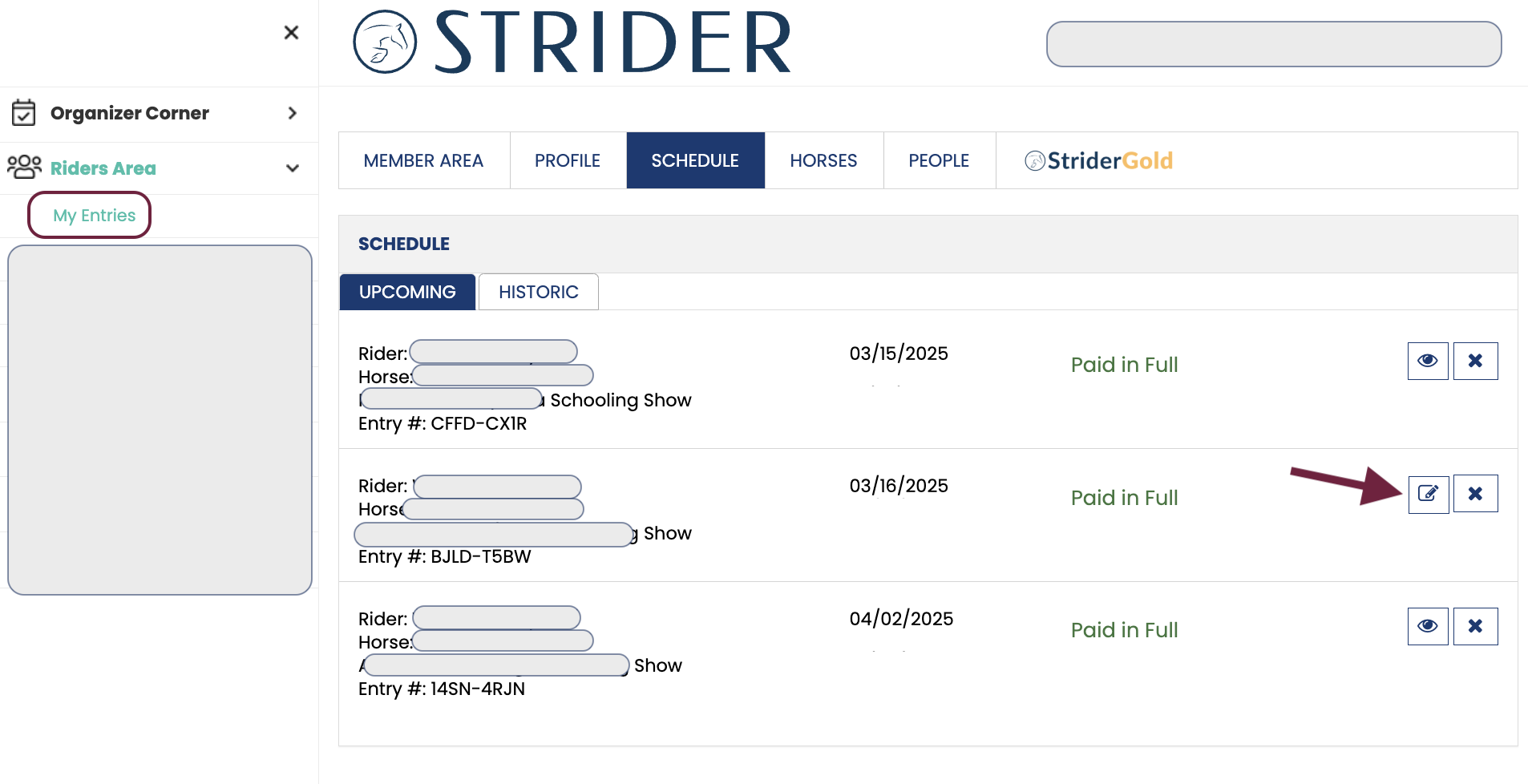
Select My Entries from the left menu.
Check the icon next to your entry:
Edit icon: Online changes are allowed.
View icon: Contact the Organizer to request changes.
Important Notes
Organizer policies vary. Fees may apply, and refunds may not be offered. Review the event’s posted terms before making changes.
Cancellation does not relieve you of any payment obligations.
If permitted, you may make ONE electronic change per registration: Horse OR Rider OR Level / Division/Class.If you need more than one change, contact the Organizer directly. Multiple changes can impact scheduling.
Scratching an Entry:
If you need to scratch, simple click the “X” next to your entry.
Once canceled, both you and the Organizer will receive an email confirmation.
Please note that refunds are handled by the Organizer, not Strider. We don’t hold funds or process refunds.
For Guest Users:
Currently, the Strider system does not support online change requests for Guest Users.
If you were not logged into your STRIDER account, or you made the entry as a “Guest User”, please contact the Organizer directly to request changes. The Organizer can manually make changes to your registration, as needed.
Be sure to provide the email address you used for the registration.