
You’re in Charge – Simple, Stress-Free Refunds with STRIDER
Need to issue a refund? You can take care of it yourself digitally in just a few clicks.
With StriderPay, no matter how the rider paid (Venmo, PayPal, or credit card), the refund goes right back to their original payment method. Pretty cool, right?
How to Issue a Refund (One Rider)
- Log into your STRIDER Organizer Corner.
Open the activity and find the rider’s entry - Note the date and time of entry – which is the same as the date/time of payment.
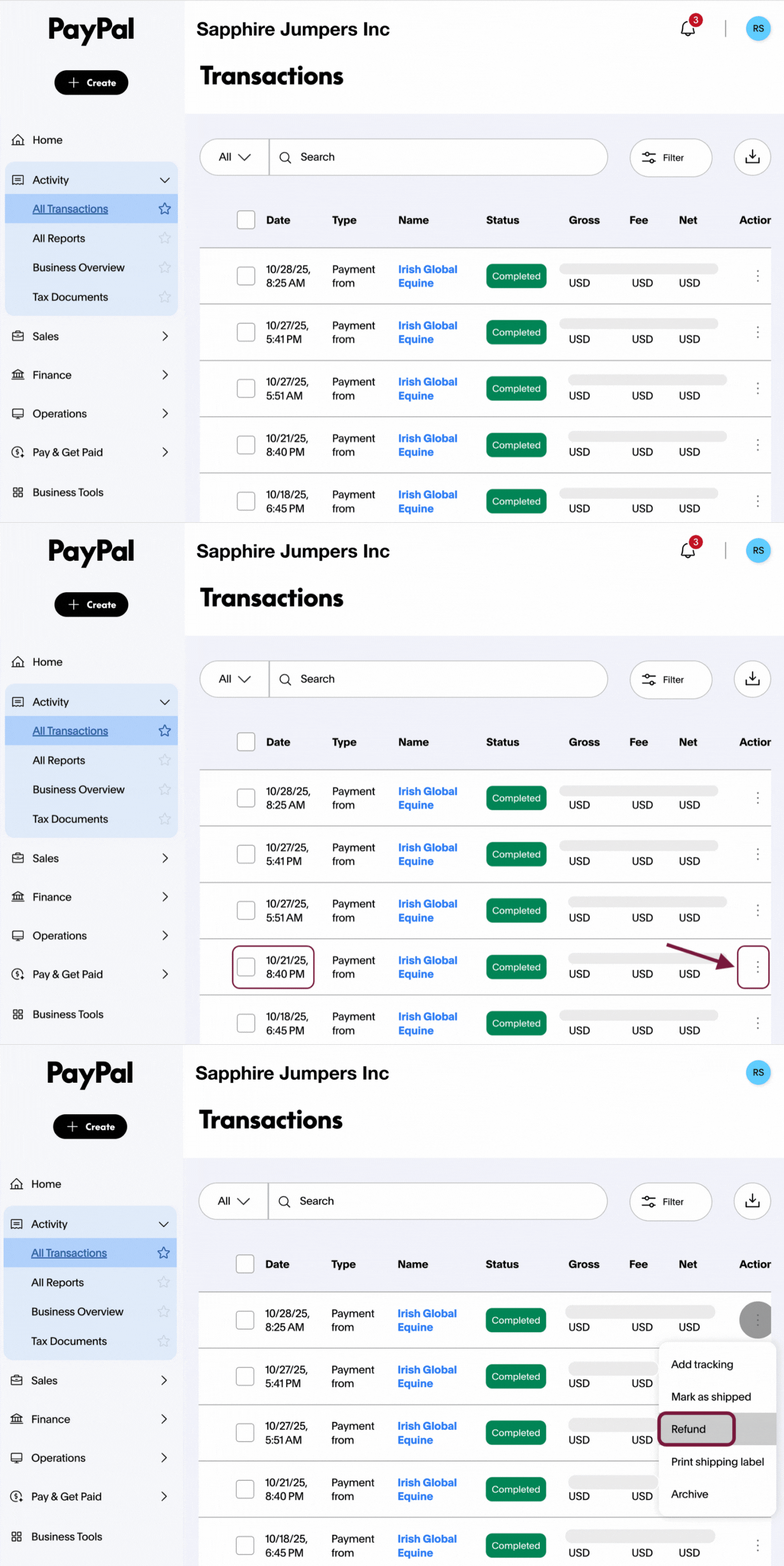
- Log into your PayPal account
Click on “All Transactions”
Find the matching payment using the date and time. Remember, the payer’s name may be different than the rider’s name (often a parent or trainer)
4. Click the three dots next to the transaction
5. Select “Refund” and follow the prompts
Done! The refund is sent automatically.
PRO TIP: Want to doublecheck before you approve?
Click into the PayPal transaction details
You’ll see exactly what selections the rider paid you for, and how much. “Dressage Test 1”, “Jumpers 1.2M Championship”, etc.
Refunding Multiple Riders
- Download your payment report from STRIDER
- Use it to match names, amounts, and timestamps
- Log into PayPal → All Transactions
- Process each refund using the report as your guide
Pro Tip: Post an Event Cancellation Policy
Consider posting a $10–$20 processing fee for event cancellations outside of organizer control —even if your policy states “no refunds.”
This does two things:
- Protects you from absorbing significant admin costs in situations like weather, natural disasters, or virus outbreak event cancellations
- Prevents you from paying out of pocket for payment processing fees retained by Visa, Mastercard, PayPal, and Venmo
Keep in mind, processing fees are never refunded to the rider. This is standard across the payments industry and is disclosed during checkout.
Since COVID, all major payment providers have stopped returning their fees—even if an event is canceled.
Setting this expectation upfront avoids confusion and protects your bottom line.
Dealing with Upset Riders or Parents?
If a parent is frustrated after a canceled event, consider offering a goodwill gesture:
Free raffle entry at your next show
- Discount code to buy their next show photos (helps you promote the show photographer too!)
Discounted schooling or future clinic spot
First pick on ride times for your next event
A small perk can go a long way toward keeping your riders happy and returning!
Need help? Reach out! We’re always here to support you.