
Here’s Your Top 3 To-Do List For More Rider Registrations 1.) Post your Strider URL on Facebook’s Equestrian Groups. The URL preview feature enables riders a quick click & enter! Learn How Here 2.) Schedule marketing items to post in the future on social media to keep the interest up. It takes just a few Read More
Resource Center
ORGANIZERS: Run A Payment Report- Verify You Were Paid
How to View Revenue Collected with StriderPay Wondering how much you’ve made—or how much was paid for a specific entry? Start right on STRIDER. At a glance- In your Organizer Dashboard:• View immediate snapshot of your earnings to date in your Organizer Dashboard. For individual entry-level details:• Download the Entry Payment Report to see individual Read More
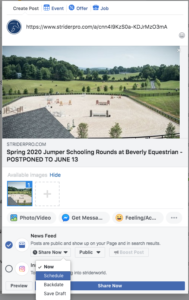
How To Schedule Facebook & Instagram Posts
How to Schedule Facebook & Instagram Posts You can easily set up your social media posts well ahead of time to announce, market, remind, and invite riders to enter your activity. If you’re not familiar with social media, don’t worry—it’s simple! Here’s a step-by-step guide to sharing your STRIDER event and boosting your entries: Step Read More
BUSINESS TIPS: 5 Ways to Battle Paperwork Procrastination
5 Tips to Battle Organizer Procrastination You really want to host great equestrian events and clinics next year… but the notion of facing all that paperwork and promotion responsibility just seems overwhelming. 1 .Use templates as much as possible. Coming up with a brand new description or flier for every single show or clinic is Read More
Save Time Each Day As An Equestrian Organizer
You want to impress your clients with fun and new opportunities at your facility, we know. But the thought of all that time at your desk to manage the organizer paperwork is a little, well, daunting. Did you know…saving 1 hour a day of paperwork gives you TWO MORE MONTHS of time each year?? It’s Read More