Skip to content
🗓️ CALENDAR
About
Organizers
How It Works
Cost
📣 StriderGold
🏦 StriderPay
StriderPlus-Waivers
Get Started
Riders
FastEntry
StriderRewards
Resources
Webinar Series
Articles & Tips
Partners
User Terms
SUPPORT
LOG IN/SIGN UP
Search
Get Started
The Strider Entry Platform- How It Works
Activities
Post Your Activity
How Do I Get To My Organizer Dashboard?
Custom Activity “Build Your Own” Feature
Edit A Posted Activity
Inventory Control
Cancel An Activity
Invite Only
⭐ Set Custom Entry Fields
⭐ Set Mandatory Fees
⭐ Add Custom Questions to Entry Form
Templates
Invite Only Feature- How it Works
Eventing
Dressage
United States Pony Clubs
Hunter/Jumper
USEF Competitions
Entries
View Your Entries
Run Entry Reports
Organizer Entry Changes
Add Documents to An Entry
Send Rider A Payment Link For An Entry Change
Moving Entries to a New Date
Scratch A Rider’s Entry
How Do Riders Change Or Cancel Entries?
Move Riders Off the Waitlist Into The Event
Strider FastEntry- Your USEF Certified Entry Software
⭐ Email Riders
Payments
StriderPay
StriderPay FAQs
StriderPay For Non-Profits
Payment Reports
Scoring
⭐ Scoring Partners
Sample Reports
Marketing
What Makes A Great Horse Show Description?
Preferred Media Partners
Email
How To Use StriderGold For Maximize Visibility on Google
⭐ Google Search Results
Boost Reach with StriderGold
Documents
StriderPlus -Waivers
Business Resources
BUSINESS TIPS | Scale Up Your Horse Business: A Checklist for Success
BUSINESS TIPS: 3 Ways to Improve Your Cash Flow From A Horse Business
BUSINESS TIPS | 3 Ways to Boost Entries To Your Next Horse Show
BUSINESS TIPS | Best Practices to Boost Complete Entries for Your Equestrian Events
Top 3 Ways To Fill Your Equestrian Clinics Fast
7 Ways to Minimize Your Refund Stress
BUSINESS TIPS: 50 of Our Favorite Equestrian Facebook Groups
BUSINESS TIPS | Run Reports For Fast Insights
BUSINESS TIPS | Best Way to Track Signed Participant Releases For Sporting Events
BUSINESS TIPS | Collect Rider Email Addresses To Boost Your Equestrian Business
BUSINESS TIPS: 3 Ways To Increase Your Show Participants # With Instagram
Get Started
The Strider Entry Platform- How It Works
Activities
Post Your Activity
How Do I Get To My Organizer Dashboard?
Custom Activity “Build Your Own” Feature
Edit A Posted Activity
Inventory Control
Cancel An Activity
Invite Only
⭐ Set Custom Entry Fields
⭐ Set Mandatory Fees
⭐ Add Custom Questions to Entry Form
Templates
Invite Only Feature- How it Works
Eventing
Dressage
United States Pony Clubs
Hunter/Jumper
USEF Competitions
Entries
View Your Entries
Run Entry Reports
Organizer Entry Changes
Add Documents to An Entry
Send Rider A Payment Link For An Entry Change
Moving Entries to a New Date
Scratch A Rider’s Entry
How Do Riders Change Or Cancel Entries?
Move Riders Off the Waitlist Into The Event
Strider FastEntry- Your USEF Certified Entry Software
⭐ Email Riders
Payments
StriderPay
StriderPay FAQs
StriderPay For Non-Profits
Payment Reports
Scoring
⭐ Scoring Partners
Sample Reports
Marketing
What Makes A Great Horse Show Description?
Preferred Media Partners
Email
How To Use StriderGold For Maximize Visibility on Google
⭐ Google Search Results
Boost Reach with StriderGold
Documents
StriderPlus -Waivers
Business Resources
BUSINESS TIPS | Scale Up Your Horse Business: A Checklist for Success
BUSINESS TIPS: 3 Ways to Improve Your Cash Flow From A Horse Business
BUSINESS TIPS | 3 Ways to Boost Entries To Your Next Horse Show
BUSINESS TIPS | Best Practices to Boost Complete Entries for Your Equestrian Events
Top 3 Ways To Fill Your Equestrian Clinics Fast
7 Ways to Minimize Your Refund Stress
BUSINESS TIPS: 50 of Our Favorite Equestrian Facebook Groups
BUSINESS TIPS | Run Reports For Fast Insights
BUSINESS TIPS | Best Way to Track Signed Participant Releases For Sporting Events
BUSINESS TIPS | Collect Rider Email Addresses To Boost Your Equestrian Business
BUSINESS TIPS: 3 Ways To Increase Your Show Participants # With Instagram
How to Get to Your Organizer Dashboard
Log into your Strider Account
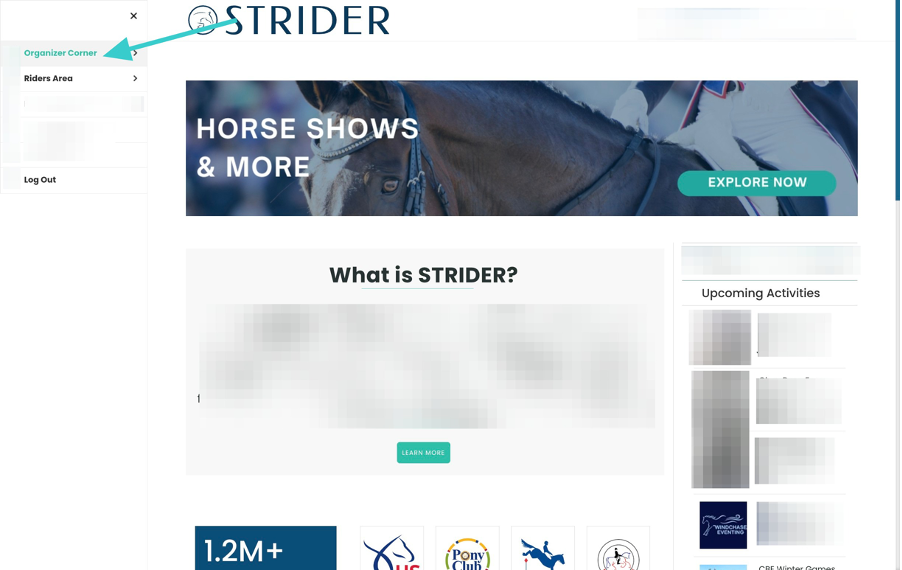
Click <
Organizer Corner
> on the left side menu
Your dashboard with any upcoming activities will appear. (If you’ve not yet posted, it will be blank)